How to use Management Ignition
Engaging managers lead to engaged employees. Management Ignition helps you hold the conversations that do it: setting goals, handing over work, giving feedback, coaching, and the regular 1-1 that brings them together. Every conversation is saved to the person's record, and the record builds your next 1-1. This guide follows one manager, Daniel, and one member of his team, Sarah.
Meet Management Ignition
Four conversations, in the order the work needs them, and the 1-1 that brings them together.
A manager knows why these conversations matter and how to have them. The hard part is finding the time to prepare each one properly. Management Ignition gives you a tool for each:
| Tool | The conversation | What you leave with |
|---|---|---|
| Goal Ignite | Setting a goal | A goal brief for them, and your notes for the conversation |
| Delegate Ignite | Handing over a piece of work | A briefing note, the delegation level, and when to check in |
| Feedback Ignite | Saying how it went | A feedback note for them, and a guide for the conversation |
| Coach Ignite | Helping them grow | A development summary, and a GROW guide for the session |
| Meeting Ignite | The 1-1, and team meetings | An agenda built from the record, the actions agreed, and a follow-up note |
Every tool gives you two things. One for them: a note to send, set in the type you are reading now, like this. One for you: private notes on how to run the conversation.
The first four tools follow the order the work needs. A goal comes first. The first piece of work follows it. Feedback follows the work. Coaching follows the feedback. The coaching often becomes the next goal.
The 1-1 brings the other four together. Meeting Ignite reads everything open on the person's record and builds the agenda from it. At the close you mark what happened to each action, and the record is ready for the next one.
The thinking behind it
Engaging managers lead to engaged employees.
Engagement is decided one manager at a time. People join a company. They stay, or leave, because of the person they report to. Strategy reaches a team only through its manager, and the team's voice reaches the top the same way.
Engaged people need three things from their manager:
Engaging managers give their people all three, conversation by conversation. Management Ignition helps you do it. It comes from thirty years of running businesses and training managers, and each tool follows our best-practice guide for one skill.
| The skill | What the person gets | The tool |
|---|---|---|
| Goal setting | Clarity on what matters and why | Goal Ignite |
| Delegating | Real ownership, and the authority to match | Delegate Ignite |
| Giving feedback | An honest picture of how they are doing, and a reason to raise their game | Feedback Ignite |
| Coaching | Growing confidence and capability | Coach Ignite |
| 1-1s and team meetings | A regular place where the rest comes together | Meeting Ignite |
Press a skill to read the method behind its tool.
The method is in every tool too. Press The method beside Back to dashboard and the same page opens over the tool, so you can check the thinking without losing your place.
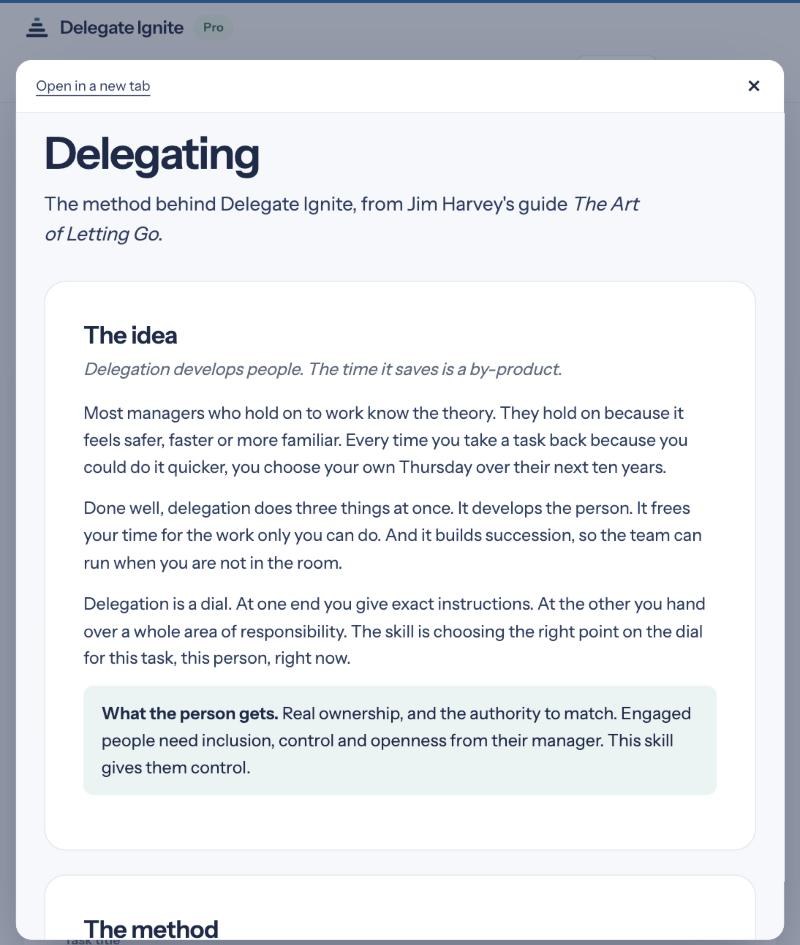
The skills work as a set
A goal without feedback drifts. Delegation without coaching sets people up to fail. Feedback without a goal to measure against feels personal. So each tool hands what you decided to the next, and the conversations about one piece of work stay together.
Every skill makes the next 1-1 better
The regular 1-1 is where goals are agreed, work is handed over, feedback is given and progress is reviewed. Every conversation you prepare here, and every action you agree, waits on the person's record. Meeting Ignite builds the next 1-1 from it.
After a programme, or on its own
If you have been on one of our programmes, these are the methods you practised in the room. The tools keep them in use back at your desk, one real conversation at a time. If you come to Management Ignition on its own, the tools do the heavy lifting. You describe the situation in your own words, and the tool applies the method, so each conversation meets the highest professional standards.
What every person gets
Source: Beck and Harter, "Managers Account for 70% of Variance in Employee Engagement", Gallup, 2015. Inclusion, control and openness come from Will Schutz's Human Element model.
Step 1: Sign in
Your work email, a six-digit code, and you are in.
Use your programme link. If you are on one of Jim's programmes, you will have a link with your programme's name in it. Open it, and the welcome page shows your programme and how long your access runs.
Enter your work email and press Email me a code. A six-digit code arrives from Management Ignition within a minute. Type it in and press Sign in. There is no password to remember. The email also carries a link, which works if you tap it on the same device within five minutes.
Your access is applied as you sign in. Your programme code goes on with you, and the Account page confirms it: "Code accepted. You have full access to all five tools until…" with the end date.
Already have an account? Sign in the same way. Your team and your records are waiting where you left them.
Your home page
Who needs a conversation from you next.
When you sign in, the app opens on your home page. This is Daniel's on a Wednesday evening:
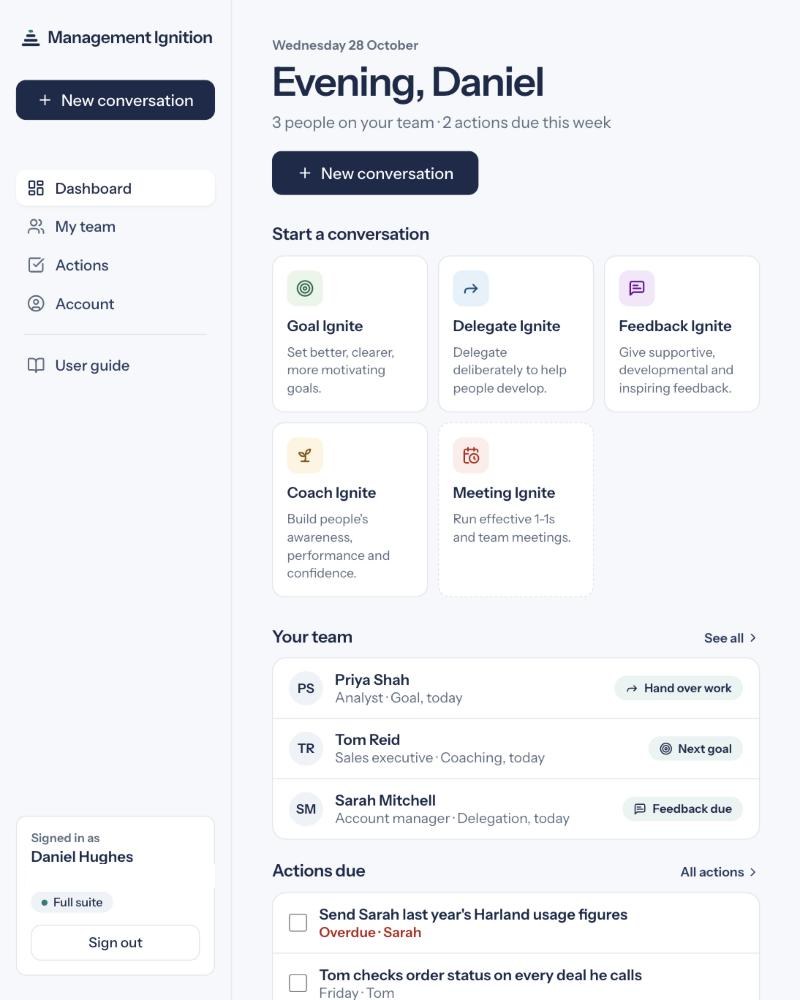
New conversation sits at the top of the page and in the side menu. It opens a short list of the five tools, with Meeting set apart.
Start a conversation shows the same five tools in the order the work needs them, each with a line on what it is for.
Your team lists each person with their role and their last conversation. Where a piece of work is waiting on you, a button says what is owed. Press it and the right tool opens on that piece of work, with what you decided carried in. It follows the person's most recent conversation.
| Their last conversation | The button | Opens |
|---|---|---|
| Goal | Hand over work | Delegate Ignite |
| Delegation | Feedback due | Feedback Ignite |
| Feedback | Take to coaching | Coach Ignite |
| Coaching | Next goal | Goal Ignite |
1-1 due appears beside a person when their next 1-1 is due: a month after the last one, or sooner if you set weekly or fortnightly when you prepared it. Press it and Meeting Ignite opens a 1-1 with them, built from their record.
Actions due lists what falls due in the next seven days. Overdue actions show in red. Tick an action when it is done and it leaves the list. All actions shows the rest.
Recent work lists your last five conversations. Press one to open that person's record.
Every number counts something to do. None of them scores your people.
Step 2: Add your people
Every conversation belongs to a person, so the record starts with them.
From the app. Open My team and add each person's name and role. Then add four short lines about them: what motivates them, where they are strong, what they are working on, and how confident they are. Every tool reads those lines, so the notes it writes sound like they are about this person.
From a tool. You can start in any tool without adding anyone first. When you finish, the tool offers Add Sarah to your team and save. One press puts Sarah on your team and saves the conversation to her record. You can add her role and the four lines later.
Someone already on your team? If the name you type matches someone on your team, the button reads Save to Sarah's record. If two people share the name, the tool will not guess. It offers to add a new person instead.
Open a tool from a person's page and their name and context are filled in for you.
Step 3: Prepare a conversation
Tell the tool what is going on, in your own words. It does the structure.
Each tool asks for the facts only you know. Daniel is setting Sarah a stretch goal in Goal Ignite:
- Goal title: "Run the Harland renewal end to end"
- What it involves: "Sarah leads the Harland renewal from first meeting to signed contract, including the pricing decision, which she recommends to me before anything goes to the client."
- What success looks like: "Harland renews for two years by 31 January with an uplift of at least 3%."
Then describe the person. Every tool asks for skill and confidence on the same scale: Low, Medium or High. Skill is how capable they are at this kind of work. Confidence is how sure they feel about it right now. The two often differ, and the advice changes when they do.
Press generate. In under a minute you have the note for them and your own notes for the room. Read both. Everything is editable, so change any word that does not sound like you before you send it.
Nothing is made up about your people. The tools write only from what you entered and what is on the person's record. Where a detail is missing, they ask you for it.
Step 5: Save it to their record
One press, and the conversation is in their history.
Under the results, press Save to Sarah's record. The button changes to Saved to Sarah's record. The conversation now sits in Sarah's History in the app, with the date, the tool and both outputs. Open it any time to copy the note or download the PDF.
Back to the app from any tool with Back to dashboard at the top of the page or under the results.
Step 6: Hand over to the next conversation
Each tool ends with one button that opens the next, on the same person.
| From | The button | Opens |
|---|---|---|
| Goal | Hand over the first piece of work | Delegate Ignite |
| Delegate | Give feedback on how it went | Feedback Ignite |
| Feedback | Take this to coaching | Coach Ignite |
| Coach | Make this Sarah's next goal | Goal Ignite |
You do not need to save first. The button saves the conversation to the person's record, waits until it is safely stored, then opens the next tool in the same tab. If the save fails, the next tool does not open, and the page tells you why.
Press it when the moment comes. Daniel sets Sarah's goal in week one and hands over the first piece of work straight away. In week three, once the check-in date has passed, he gives feedback on how it went. In week four he takes it to coaching.
What carries across
The next tool opens with what you decided, word for word.
At the top of the next tool, a panel says where the work came from and shows what you wrote, exactly as you wrote it. The line at the top links back to the person's record.
| Hand-over | What the next tool shows |
|---|---|
| Goal to Delegate | The goal, what it involves, what success looks like, the deadline, the stretch and the challenge zone. Skill and confidence are filled in. |
| Delegate to Feedback | The task, what was agreed, the delegation level and the check-in date. The task becomes what the feedback is about. |
| Feedback to Coach | Your feedback notes. The task becomes the coaching topic. |
| Coach to Goal | The coaching topic, as the first draft of the next goal, with skill and confidence filled in. |
Still true? Skill and confidence change between conversations. When they are carried across, each one asks you to check. If Sarah has grown in confidence since the goal, change it before you generate.
Nothing is locked. Change anything that was carried, or ignore it. It is a starting point you can edit.
When Delegate notices something
Two things the record can see, each said once, in plain words.
Delegate Ignite recommends a delegation level. It also reads the person's record. Where the record and the level pull in different directions, it says so under the level.
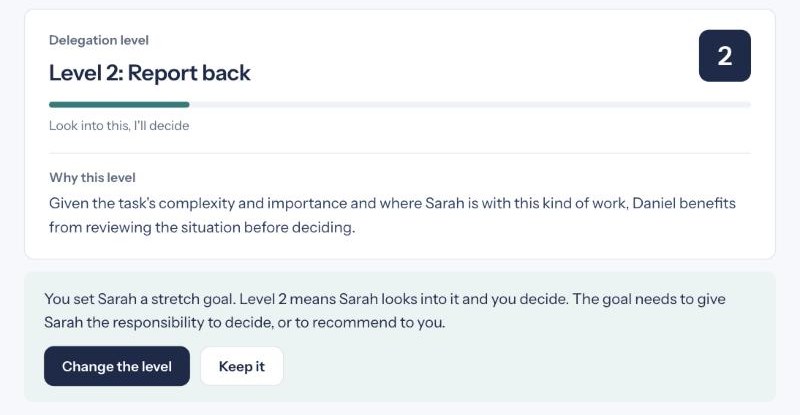
A stretch goal at a low level
Daniel set Sarah's Harland goal at High stretch. If the delegation that follows comes in at level 4 or below, Delegate says:
Comfortable neglect
Say Tom's skill and confidence are both High, and this would be the fifth piece of work he gets at level 3 or below. Delegate says: "Low challenge with high support is comfortable. It's also a slow form of neglect: you're taking good care of someone while doing nothing to help them get better." The words come from The Art of Letting Go. You see this at most once every 90 days for each person.
Your choice
Change the level opens the ten levels. Pick one, and your notes and the briefing note are written again at that level. Keep it leaves everything as it is. Either choice is saved with the conversation and counted nowhere.
You can change the level at any time, notice or not, with Change the level under the level.
The words are fixed. No model writes them, so the same situation always gets the same sentence.
One piece of work, one line
Every hand-over keeps the conversations about one piece of work together.
The first conversation about a piece of work opens a thread. It takes its name from what you wrote: the goal title, the task, or what the feedback is about, cut to about eight words. Every conversation you hand on from it joins the same thread.
Several pieces of work at once. Sarah may have three things running. Each has its own thread, and they never mix. A delegation you start from scratch, rather than from a goal, opens a new thread named after the task.
The person's History lists every conversation by date. The thread is what ties the conversations about one piece of work together behind it.
Start something new on the same page with New goal, New delegation or New session. The new work starts its own thread, so it is never filed under the last one.
Work in progress
Every piece of work on one line, with the step due next.
On a person's page, Work in progress shows each piece of work as one line. It has the work's name, its conversations in order, and the step due next.
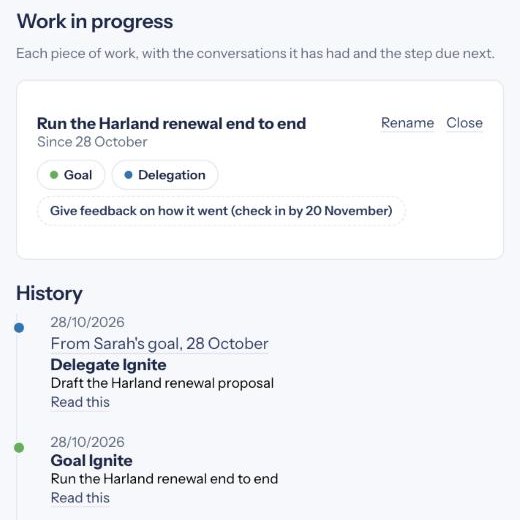
- Open a conversation by pressing it. The History below opens at that entry.
- Take the next step with the button at the end of the line. It opens the right tool with what you decided carried in.
- Rename a piece of work when the name taken from your first words does not fit.
- Close a piece of work when it is finished. It moves under Show quiet work, where you can reopen it.
- Quiet work. A piece of work untouched for 90 days moves under Show quiet work on its own. Nothing is deleted.
Where each conversation came from. In the History, a conversation handed on from another says so, for example "From Sarah's goal, 3 November". Press it to open that conversation.
The 1-1 has its own line. A 1-1 covers all of a person's work, so it sits above Work in progress, under 1-1s: when the last one was and when the next is due, with Prepare the next 1-1. Every 1-1, and every team meeting the person came to, is in their History.
Step 7: Hold the 1-1
The record builds the agenda.
On Sarah's page, press Prepare the next 1-1. Or press 1-1 due beside her name on your home page. Meeting Ignite opens a 1-1 with Sarah. You can also open Meeting Ignite, choose 1-1 and pick her from your team.
What the record brings
Meeting Ignite reads Sarah's record and lists everything open under From Sarah's record:
- Each piece of work, with the goal and its deadline, what success looks like, the delegation level, the check-in date, and the last feedback and coaching.
- Every open action, yours and hers, overdue first.
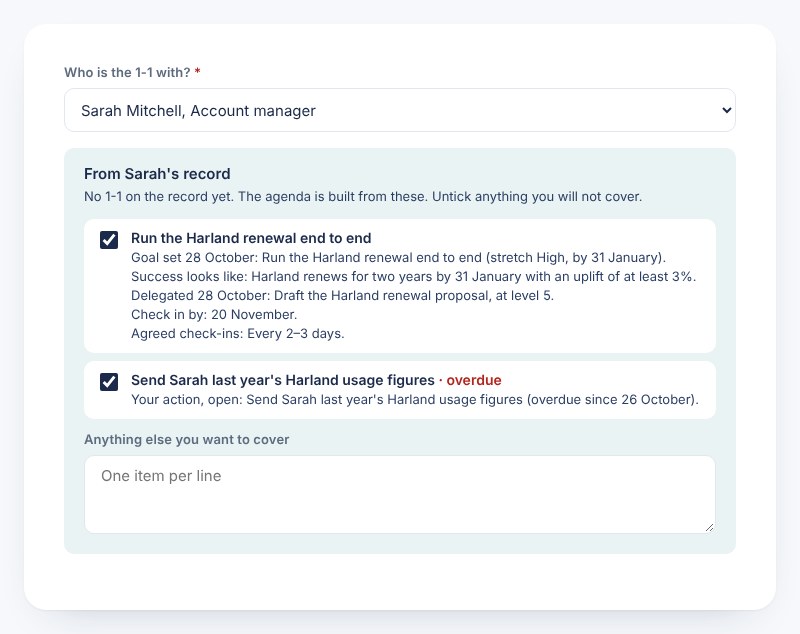
Untick anything you will not cover. Add your own items, one per line. The purpose of the 1-1 is optional, because the agenda already holds everything open. Choose how often you meet: weekly, fortnightly or monthly. Monthly is the minimum.
The agenda
Press Generate meeting guide. The agenda runs in this order:
- Sarah's own items first.
- Each item you kept, with one question for her to think about beforehand.
- What we agree: who does what, by when.
Send it with plenty of notice, so Sarah comes prepared. Your private notes cover how to let her speak first on every item, when to listen and when to respond, how to raise an overdue action plainly and own it if it is yours, and how to close with actions she owns.
The items come straight from the record. The tool cannot leave one out or add one. It drafts only the words around them, from the record alone.
The 1-1 is saved to Sarah's record as soon as the agenda is ready.
Step 8: Close the 1-1
The close writes back what happened.
After the 1-1, press Close the meeting. Each action from Sarah's record has four buttons:
| Press | What happens on the record |
|---|---|
| Done | It leaves the open list and shows in Sarah's History as completed. |
| Carried | It stays open. Give it a new date if it has one. |
| Changed | Write the action as it now stands, with a new date if it needs one. |
| Dropped | It leaves the open list. The record keeps that you dropped it. |
Then add the new actions you agreed, each with an owner (Sarah, you, or both of you) and a date.
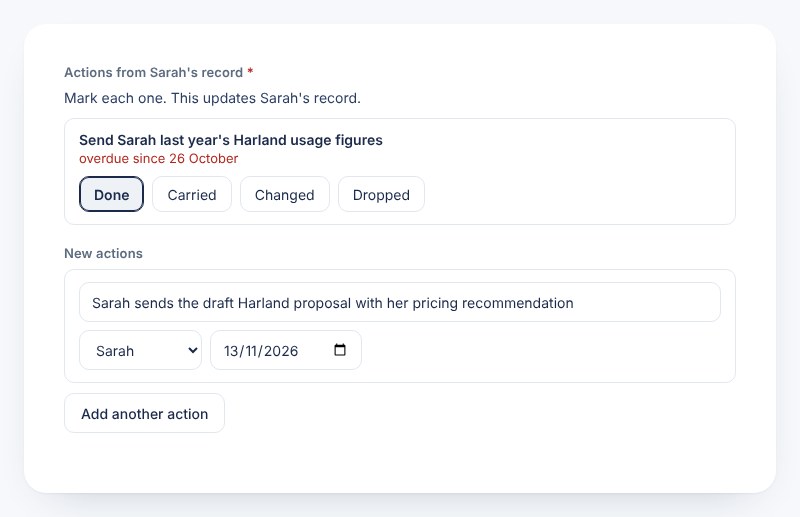
Press Save to the record and write the follow-up. Everything is saved in one go: each action you marked, each new one, and the 1-1 on Sarah's record. If anything fails, nothing is saved, and the page tells you. The page confirms what was written, for example "Saved to Sarah's record: 1 action reviewed, 1 new action."
Then you get an actions summary, a follow-up note to Sarah, and a short review of how the 1-1 ran, for you alone. The notes use only what you entered. They promise nothing you did not agree.
On Sarah's page, the new action sits under Open actions, and the 1-1s line moves on: "Last 1-1: 29 October. Next due by 28 November (monthly)." On your home page, the overdue action has gone from Actions due.
Team meetings
One meeting, on the record of everyone who came.
Meeting Ignite also prepares team meetings, project kick-offs and problem-solving sessions. Give it the outcome you want, who will be there, how long you have and how well the group knows each other. It returns a timed agenda and a facilitation guide.
At the close, tick who came from your team under Who came, and enter the actions agreed. The meeting goes on each person's record and shows in their History. The page names them: "Saved to your record and to Tom's and Priya's records." The actions go into the summary you send. To put an action on one person's record, add it on their page or at their next 1-1.
Every meeting you prepare is listed under History in Meeting Ignite, and under Recent work on your home page.
Start anywhere
The order is a suggestion. Real work rarely starts at the beginning.
Most weeks, a job lands and needs delegating today. Open Delegate Ignite and start there. When you finish, it offers the next step forward, and the chain runs on from that point.
Feedback that does not follow a delegation works the same way. It starts its own thread, named from the first words of your notes. Coach Ignite opens from it with your notes in place and the topic left for you to write.
What is stored, and who sees it
Your notes about your people are yours.
- Only you can read your records. If your employer pays for your licence, its administrator sees how many seats are used and nothing else: no names, no notes, no feedback.
- No ratings and no scores. The record holds conversations and what was agreed. It is never an appraisal.
- Stored in the EU, in Stockholm.
- Download or remove. On a person's page you can download everything held about them, or remove them and every record about them. On the Account page you can download everything you hold, or close your account.
Write every note as if the person might read it one day. They have the right to ask, and the tools are built so that everything here is fit to be shown to them.
Get help
One email reaches Jim.
The code did not arrive? Check your junk folder for an email from Management Ignition, then request a new one. A code lasts an hour.
The next tool opened empty? If the work it came from could not be loaded, the tool says so at the top of the page. Nothing has been lost: the button saved your work before it opened the next tool, and it is on the person's record. Fill in the new tool by hand, and email Jim the time it happened so we can find out why.
The close could not be saved? Nothing was written, so nothing is half done. Press the button again. If the actions saved and only the summary failed, the page says so, and pressing again writes the summary without saving the actions twice.
Anything else, email jim.harvey@themessagebusiness.com.